If you are stuck with using WordPress, sometimes smallest things can make a huge difference:
ALTER TABLE `wp_postmeta`
ADD INDEX `meta_key_then_value` (`meta_key`, `meta_value`(100));
This is because many plugins and other crap uses a meta_value as a store for datetimes etc. That is very slow to sort without.
One page went from loading 27 seconds, to whopping two seconds. Which is still slow, but bearable with cache in front.
Wednesday, June 20, 2018

Thursday, November 12, 2015
Inject a function (instead of DLL) to target process in Windows
When I was doing my Disable Flashing Taskbar Buttons patch to explorer.exe first I did it by injecting AutoHotkey.dll inside explorer.exe and patched it this way.
Since the only thing I needed was a call GetWindowLongPtrW to get the task switcher memory location, I started to look a better way.
Turns out it's quiet simple.
CreateRemoteThread is the function (usually?) used to inject a DLL by making target process to run LoadLibrary, but instead you can of course use it to run arbitrary assembly since it takes address.
Only trick is to turn your function (in my case call to GetWindowLongPtrW) to function call that takes single argument.
I made a little C program for this:
struct MyParams {
HWND hWnd;
int nIndex;
LONG_PTR res;
};
void __stdcall myInjectFunction(LPVOID params) {
MyParams *myParams = (MyParams*) params;
myParams->res = GetWindowLongPtrW(myParams->hWnd, myParams->nIndex);
}
int main()
{
MyParams myParams;
myParams.hWnd = (HWND) 0x123456;
myParams.nIndex = 0xFF;
myInjectFunction(&myParams);
return 0;
}
Since the only thing I needed was a call GetWindowLongPtrW to get the task switcher memory location, I started to look a better way.
Turns out it's quiet simple.
CreateRemoteThread is the function (usually?) used to inject a DLL by making target process to run LoadLibrary, but instead you can of course use it to run arbitrary assembly since it takes address.
Only trick is to turn your function (in my case call to GetWindowLongPtrW) to function call that takes single argument.
I made a little C program for this:
struct MyParams {
HWND hWnd;
int nIndex;
LONG_PTR res;
};
void __stdcall myInjectFunction(LPVOID params) {
MyParams *myParams = (MyParams*) params;
myParams->res = GetWindowLongPtrW(myParams->hWnd, myParams->nIndex);
}
int main()
{
MyParams myParams;
myParams.hWnd = (HWND) 0x123456;
myParams.nIndex = 0xFF;
myInjectFunction(&myParams);
return 0;
}
myInjectFunction is the function to be injected, above code must be compiled by disabling inlining. If you run it through disassembler e.g. "dumpbin /disasm /all yourprogram.exe" you should get something like:
40 53 push rbx
48 83 EC 20 sub rsp,20h
8B 51 08 mov edx,dword ptr [rcx+8]
48 8B D9 mov rbx,rcx
48 8B 09 mov rcx,qword ptr [rcx]
FF 15 6B 10 00 00 call qword ptr [__imp_GetWindowLongPtrW]
48 89 43 10 mov qword ptr [rbx+10h],rax
48 83 C4 20 add rsp,20h
5B pop rbx
C3 ret
CC
Above is assembly 101 function body, with some ptr trickery. This assembly contains a one flaw though, for to be uses as is, even though GetWindowLongPtrW is in known memory location (user32 and kernel32 has de-facto memory locations) it's not in right form to be used.
The call to GetWindowLongPtrW must be in longer form:
40 53 push rbx
48 83 EC 20 sub rsp,20h
8B 51 08 mov edx,dword ptr [rcx+8]
48 8B D9 mov rbx,rcx
48 8B 09 mov rcx,qword ptr [rcx]
48 B8 XX XX XX XX XX XX XX XX movabs rax, GetWindowLongPtrW
FF D0 call rax
48 89 43 10 mov qword ptr [rbx+10h],rax
48 83 C4 20 add rsp,20h
5B pop rbx
C3 ret
CC
You can try out changing the assembly runtime with x64dbg until it works.
In this demonstration I won't fill the 8 byte (XX) address because you have to determine it runtime by calling GetProcAddress and then transforming it to reversed hexadecimal form.
In this demonstration I won't fill the 8 byte (XX) address because you have to determine it runtime by calling GetProcAddress and then transforming it to reversed hexadecimal form.
After this one simply writes the bytes using WriteProcessMemory and calls CreateRemoteThread with newly created memory address and it just works just like the C equivalent did.
Now my script was dependency free, pure AHK script.
Saturday, October 31, 2015
In-memory patching explorer.exe to prevent flashing task bar buttons
I've waited for a long time so that Microsoft introduces virtual desktops. I used third party programs, mostly VirtuaWin and mdesk (which source code I happened to have.)
Yet when Windows 10 introduced the virtual desktops, they screwed one part that was about to drive me crazy: Flashing task bar buttons shows up in all virtual desktops, and annoys the hell out of you when working on different desktop.
This couldn't go on. I had to find way to prevent this.
1st attempt:
Disassembling user32.dll with simple (dumpbin /all /asm), and patching the FlashWindow(Ex) to do nothing. Would have worked just fine and was easy to do, except that you don't patch user32.dll on this day and age, too many anti-malware tools will scream at you.
2nd attempt:
In-memory patching explorer.exe and preventing the task bar buttons from flashing.
First I had to find out the message which caused the FlashWindowEx message to be run. Hatched up a small program that flashes the task bar button after a timeout. Then a tool here I used is Spy++ (64bit). Only trick is to go upwards the tree, where SHELLHOOK is first posted:
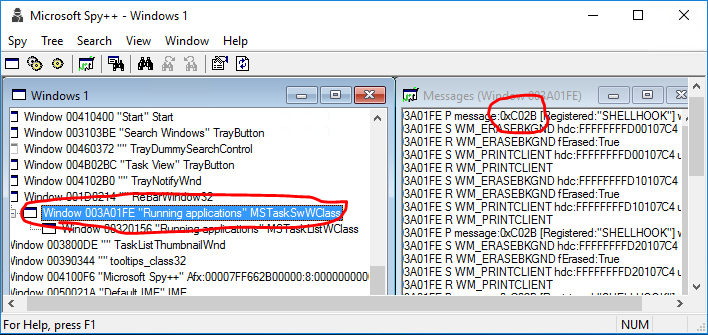
Above was the simple part for me, I had used Spy++ many times.
Next came a part that I've not had a need to do, debugging a explorer.exe. Tool I found was x64dbg, excellent tool, yet really confusing if you've not done debugging in assembly level ever, or for a short period of time long time ago. Last time I dabbled on assembly level debugging was with SoftICE, and that was discontinued in 2000! (Though I probably tried it somewhere after 2000, it was usable long after)
First I thought I just flash the button and keep stepping the explorer.exe and find miraculously the piece of code. Turns out the explorer.exe has a lot of threads, and x64dbg does not have tracing capability (yet), so that was no go.
I tried hitting C02B in the pattern search, for no avail.
I knew how windows message handling works, so I knew there had to be WndProc somewhere in task switcher, if I could just find the damn thing. After banging my head, I decided to open a question StackExchange Reverse Engineering of how to find WndProc in x64dbg? Got a really helpful and comprehensive answer from blabb.
You have to call from within the program you debug a user32.GetWindowLongPtrW(hwnd, GWLP_WNDPROC) where hwnd I already knew, from Spy++.
Blabb knew how to write a script to do so, the x64dbg has no documentation, it inherits scripting features apparently from other debuggers like ollydbg. I couldn't have written the script commands, assembly I knew though.
Here is the script to call GetWindowLongPtrW by blabb:
alloc
asm $lastalloc,"push rcx"
$result1 = $lastalloc+$result
asm $result1,"push rdx"
$result1 += $result
asm $result1,"push rax"
$result1 += $result
asm $result1,"mov rcx, [TYPE THE HWND HERE]"
$result1 += $result
asm $result1,"mov rdx, -4"
$result1 += $result
asm $result1,"mov rax, [TYPE ADDRESS using CTRL+G and type user32.GetWindowLongPtrW]"
$result1 += $result
asm $result1,"call rax"
$result1 += $result
asm $result1,"pop rdx"
$result1 += $result
asm $result1,"pop rax"
$result1 += $result
asm $result1,"pop rcx"
(You can of course write to any position in the memory just by double clicking and typing asm, it's a bit faster way sometimes if re-usability is not an issue.)
Now if you run this script, it does nothing. Nothing really happens on your screen, it does not change register etc. It just writes the commands in newly allocated address in memory you find from status bar:
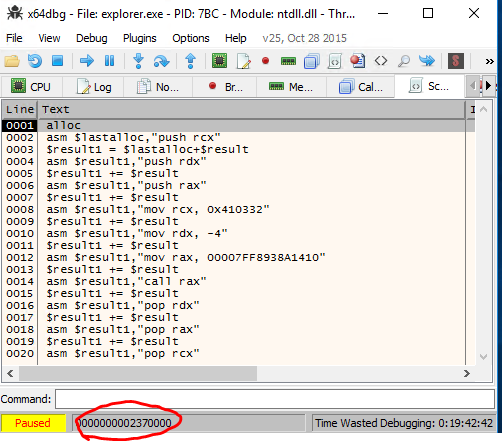
Now you go to this address (Ctrl+G) and you find the code inserted in there:

You move the RIP to there and set breakpoint somewhere after call rax, and before you pop the RAX. The address of WndProc is in the RAX. In my case it was: 00007FF6361C9880. You can verify this also restarting the instance and running it again, it should give same address even if you restart the instance, but not when you restart the computer or virtual machine apparently.
Now that I had my magical address, I could finally (!) see also the message if I triggered the FlashWindowEx and set the breakpoint there:

I just simply zero the RDX register when 0xC02B (SHELLHOOK) and wParam 0x8006 (HSHELL_FLASH) appears in the registers and BOOM! Flashing task bar buttons does not appear, amazing! First time I managed to get it ignore it.
I knew zeroing the message (RDX) would be relatively safe (as long as I zero it out only on 0xC02B and when wParam is HSHELL_FLASH) because all WndProcs are just dummy switch cases on messages that falls back on DefaultProc.
Armed with this knowledge I could write a live patch using x64dbg to demonstrate and test the patch before writing a program that patches the explorer.exe.
I replaced one two byte instructinon (push r14) with a short jump and jumped upwards: (Here is two jumps I've added, one in the middle of WndProc (red one), and upper one in with green dot in front)

Then I added my logic for emptying RCX, when C02B and 0x8006 appears in register. This I threw at the bottom of the module since I could not find space from above:

"Push r14" is the instruction I replaced in the WndProc, so I had to run that before returning to it.
And now I had perfectly running explorer.exe, without flashing task bar buttons feature.
Get the final patch as AutoHotkey script from GitHub: DisableFlashingTaskbarButtons I tested it with Windows 10, builds 10565 and 10240. It's written on AutoHotkey and can be used without further dependencies.
Yet when Windows 10 introduced the virtual desktops, they screwed one part that was about to drive me crazy: Flashing task bar buttons shows up in all virtual desktops, and annoys the hell out of you when working on different desktop.
This couldn't go on. I had to find way to prevent this.
1st attempt:
Disassembling user32.dll with simple (dumpbin /all /asm), and patching the FlashWindow(Ex) to do nothing. Would have worked just fine and was easy to do, except that you don't patch user32.dll on this day and age, too many anti-malware tools will scream at you.
2nd attempt:
In-memory patching explorer.exe and preventing the task bar buttons from flashing.
First I had to find out the message which caused the FlashWindowEx message to be run. Hatched up a small program that flashes the task bar button after a timeout. Then a tool here I used is Spy++ (64bit). Only trick is to go upwards the tree, where SHELLHOOK is first posted:
Above was the simple part for me, I had used Spy++ many times.
Next came a part that I've not had a need to do, debugging a explorer.exe. Tool I found was x64dbg, excellent tool, yet really confusing if you've not done debugging in assembly level ever, or for a short period of time long time ago. Last time I dabbled on assembly level debugging was with SoftICE, and that was discontinued in 2000! (Though I probably tried it somewhere after 2000, it was usable long after)
First I thought I just flash the button and keep stepping the explorer.exe and find miraculously the piece of code. Turns out the explorer.exe has a lot of threads, and x64dbg does not have tracing capability (yet), so that was no go.
I tried hitting C02B in the pattern search, for no avail.
I knew how windows message handling works, so I knew there had to be WndProc somewhere in task switcher, if I could just find the damn thing. After banging my head, I decided to open a question StackExchange Reverse Engineering of how to find WndProc in x64dbg? Got a really helpful and comprehensive answer from blabb.
You have to call from within the program you debug a user32.GetWindowLongPtrW(hwnd, GWLP_WNDPROC) where hwnd I already knew, from Spy++.
Blabb knew how to write a script to do so, the x64dbg has no documentation, it inherits scripting features apparently from other debuggers like ollydbg. I couldn't have written the script commands, assembly I knew though.
Here is the script to call GetWindowLongPtrW by blabb:
alloc
asm $lastalloc,"push rcx"
$result1 = $lastalloc+$result
asm $result1,"push rdx"
$result1 += $result
asm $result1,"push rax"
$result1 += $result
asm $result1,"mov rcx, [TYPE THE HWND HERE]"
$result1 += $result
asm $result1,"mov rdx, -4"
$result1 += $result
asm $result1,"mov rax, [TYPE ADDRESS using CTRL+G and type user32.GetWindowLongPtrW]"
$result1 += $result
asm $result1,"call rax"
$result1 += $result
asm $result1,"pop rdx"
$result1 += $result
asm $result1,"pop rax"
$result1 += $result
asm $result1,"pop rcx"
(You can of course write to any position in the memory just by double clicking and typing asm, it's a bit faster way sometimes if re-usability is not an issue.)
Now if you run this script, it does nothing. Nothing really happens on your screen, it does not change register etc. It just writes the commands in newly allocated address in memory you find from status bar:
Now you go to this address (Ctrl+G) and you find the code inserted in there:
Now that I had my magical address, I could finally (!) see also the message if I triggered the FlashWindowEx and set the breakpoint there:
I knew zeroing the message (RDX) would be relatively safe (as long as I zero it out only on 0xC02B and when wParam is HSHELL_FLASH) because all WndProcs are just dummy switch cases on messages that falls back on DefaultProc.
Armed with this knowledge I could write a live patch using x64dbg to demonstrate and test the patch before writing a program that patches the explorer.exe.
I replaced one two byte instructinon (push r14) with a short jump and jumped upwards: (Here is two jumps I've added, one in the middle of WndProc (red one), and upper one in with green dot in front)
Then I added my logic for emptying RCX, when C02B and 0x8006 appears in register. This I threw at the bottom of the module since I could not find space from above:
And now I had perfectly running explorer.exe, without flashing task bar buttons feature.
Get the final patch as AutoHotkey script from GitHub: DisableFlashingTaskbarButtons I tested it with Windows 10, builds 10565 and 10240. It's written on AutoHotkey and can be used without further dependencies.
Saturday, October 13, 2012
ImageMagick: Save for web (JPG)
Okay this is required in all web applications that allows people to upload images for viewing in browser:
convert input.jpg -profile AdobeRGB1998.icc -colorspace sRGB -auto-orient output.jpg
Notice that in above input.jpg need not to be jpg, it can be BMP/PNG... any format that imagemagick reads, it's perfect way to convert anything user uploads to the JPG.
I got a gaping wound as group of users had managed to upload bunch of JPG images with CMYK profiles! As a programmer it would be far easier if there were command like convertweb or something that would just converted any image to PNG or JPG that just works in browsers.
convert input.jpg -profile AdobeRGB1998.icc -colorspace sRGB -auto-orient output.jpg
Notice that in above input.jpg need not to be jpg, it can be BMP/PNG... any format that imagemagick reads, it's perfect way to convert anything user uploads to the JPG.
I got a gaping wound as group of users had managed to upload bunch of JPG images with CMYK profiles! As a programmer it would be far easier if there were command like convertweb or something that would just converted any image to PNG or JPG that just works in browsers.
Friday, June 22, 2012
Scala cast if possible when getting from Map
object MyAsDefaultTest extends App {
implicit def anyDefaultVal(theoption : Option[Any]) = { new { def asDefault[A](default: A) : A = try { default.getClass.cast(theoption.getOrElse(default)) } catch { case _ => default } } }
override def main(args: Array[String]) { val numbers = Map(1 -> 123, 2 -> 321.123, 3 -> "fail")
println(numbers.get(1).asDefault(-1) * 3) // Returns 123 println(numbers.get(2).asDefault(-1) * 3) // Returns -3 println(numbers.get(3).asDefault(-1) * 3) // Returns -3 println(numbers.get(999).asDefault(-1) * 3) // Returns -3
println(numbers.get(3).asDefault("") + "test") // Returns "failtest" println(numbers.get(2).asDefault(0.0) + 100) // Returns 421.123 }}Friday, January 13, 2012
iPad & iPhone targetting
/* iPad [portrait + landscape] */
@media only screen and (min-device-width: 768px) and (max-device-width: 1024px) {
 .selector-01 { margin: 10px; }
 .selector-02 { margin: 10px; }
 .selector-03 { margin: 10px; }
}

/* iPhone [portrait + landscape] */
@media only screen and (max-device-width: 480px) {
 .selector-01 { margin: 10px; }
 .selector-02 { margin: 10px; }
 .selector-03 { margin: 10px; }
}

/* == iPad/iPhone [portrait + landscape] == */
@media only screen and (min-device-width: 768px) and (max-device-width: 1024px),
@media only screen and (max-device-width: 480px) {
 .selector-01 { margin: 10px; }
 .selector-02 { margin: 10px; }
 .selector-03 { margin: 10px; }
}
Stolen from PreishablepressFriday, October 21, 2011
Sticky Footer & Variable Height - modern CSS
Copy & Pasted from http://pixelsvsbytes.com/blog/2011/09/sticky-footers-the-flexible-way/ Page was down for me, so salvaged this from Bing search cache (Google cache didn't have):
-- cut --
-- paste --Step 3: All we have to do now is to put our CSS and HTML code together. Fortunately we can use the
bodyelement as .Frame, so there is no need for an extradivtag or so.<!DOCTYPE HTML> <html> <head> <style type="text/css"> html, body { height: 100%; margin: 0pt; } .Frame { display: table; height: 100%; width: 100%; } .Row { display: table-row; } .Row.Expand { height: 100%; } </style> </head> <body class="Frame"> <header class="Row"><h1>Catchy header</h1></header> <section class="Row Expand"><h2>Awesome content</h2></section> <footer class="Row"><h3>Sticky footer</h3></footer> </body> </html>Note: Remember to include the html5shiv workaround in your page (and define appropriate CSS styles) if you want to use HTML5 tags in IE8 and below. Or simply use
divtags instead ofheader,sectionandfooter.A word on older browsers
The code above will work even with older versions of Firefox, Opera and Safari, so there is nothing to worry about here, but unfortunately Internet Explorer 7 and below don’t know anything about
display:tableordisplay:table-row, so we go the way of graceful degradation here.The first thing we have to to is, to prevent the margins of elements inside the row from being outside of it, by adding
overflow:hiddento the.Rowstyle.That gives us quite acceptable results, but the footer will always be outside of the window due to the 100% height of the
.Frameand the.Row. The solution is to setheight:100%in a way that all Internet Explorer versions below 8 won’t recognize. I’m using the (valid)html>/**/bodyCSS hack to accomplish this, but you might also use conditional comments if you feel better that way. However, here is the fixed CSS:.Frame { display: table; width: 100%; } html>/**/body .Frame { height: 100%; } .Row { display: table-row; overflow: hidden; } html>/**/body .Row.Expand { height: 100%; }I guess it shouldn’t be too complicated to create a sticky footer by adjusting the height of
.Row.Expandwith some little Javascript.
Tuesday, September 27, 2011
WP: Turn Off Comments / Ping Backs by Default from Pages
Turn Off Comments / Ping Backs by Default from Pages
Themes functions.php or yourplugin.php:
Snippet above turns off the check boxes only from New Pages, any existing pages must be unchecked manually.
Themes functions.php or yourplugin.php:
// This is valid hack as long as "wp-admin/includes/post.php"
// `get_default_post_to_edit()` keeps calling `apply_filter()` for
// `default_content` *after* `comment_status` and `ping_status` setting.
function my_disable_pages_default_commenting($content, $post) {
    if ($post->post_type == 'page') {
        $post->comment_status = "closed";
        $post->ping_status = "closed";
    }

    return $content;
}
add_filter('default_content', 'my_disable_pages_default_commenting', 1, 2);
Snippet above turns off the check boxes only from New Pages, any existing pages must be unchecked manually.
Friday, September 23, 2011
Duplicate All Pages (in-place) in Acrobat X
This is just a small JavaScript extension to Acrobat X that allowes to Duplicate all pages in-place there exists another version which used extractPages and I didn't like that behavior so I wrote own.
First elevate privileges of the JavaScript programs:
Now you should be able to access the "Duplicate all pages (in-place)" under "Edit" menu item. If you can't see the item remember to restart Acrobat.
First elevate privileges of the JavaScript programs:
- Right click on document, and choose "Page Display Preferences"
- Choose "JavaScript" from the left.
- Check the "Enable menu items JavaScript execution privileges".
%appdata%\Adobe\Acrobat\10.0\JavaScripts folder:app.addMenuItem({
cExec: "duplicatePagesInPlace();",
cParent: "Edit",
cName: "Duplicate all pages (in-place)"
});
function duplicatePagesInPlace() {
var doc = this,
pages = this.numPages;
for (var i = pages - 1; i >= 0; i--) {
doc.insertPages({
cPath: doc.path,
nStart : i,
nEnd : i,
nPage : i
});
}
}
Now you should be able to access the "Duplicate all pages (in-place)" under "Edit" menu item. If you can't see the item remember to restart Acrobat.
Saturday, July 30, 2011
Windows 7 - Photo Viewer was really slow
Windows 7 Photo Viewer was acting really slow for loading images, this fixed it:
That did the trick.
- Go to Color management (Desktop -> Screen Resolution -> Advanced Settings -> Color Management -> Color Management -> Advanced (tab) -> Change System Defaults)
- Remove all profiles from all screens, and add single profile per display. (I chose sRGB virtual device mode profile.)
- Check the colors in Photo Viewer if the colors are fine then you chose good profile.
That did the trick.
Saturday, January 22, 2011
Where Django & PyDev fails
Don't get me wrong, I like Python, PyDev and Django. But I simply hate the small problems like this:

I forget something simple, like what was the order of return tuple of
Same thing with the god damned exception handling. I don't think I've seen any official package that lists the exceptions given function may rise. All functions should have a good doc-strings that lists parameters, exceptions (including nested) and in case the return value is tuple or something non obvious the order of items in tuple.
Simply, it takes ages to open up the webpage, and browse to right place of docs. There exists a fix, but PyDev does not support it. It's the official objects.inv for Django (sphinx mapping file from keyword to URI).
I forget something simple, like what was the order of return tuple of
get_or_create? Then I try to look the tip of the function, and what do I get? The useless **kwargs passing.Same thing with the god damned exception handling. I don't think I've seen any official package that lists the exceptions given function may rise. All functions should have a good doc-strings that lists parameters, exceptions (including nested) and in case the return value is tuple or something non obvious the order of items in tuple.
Simply, it takes ages to open up the webpage, and browse to right place of docs. There exists a fix, but PyDev does not support it. It's the official objects.inv for Django (sphinx mapping file from keyword to URI).
Sunday, December 12, 2010
Windows 7 - QoS Policies not working
I've noticed that QoS Policies does not work in Windows 7.
Solution (thanks to xedoc in speedguide.net):
I configure them using "Group Policy Manager", followingly:

And capturing using WireShark like this:

Solution (thanks to xedoc in speedguide.net):
Windows Registry Editor Version 5.00

[HKEY_LOCAL_MACHINE\SYSTEM\CurrentControlSet\services\Tcpip\QoS]
"Do not use NLA"="1"
I configure them using "Group Policy Manager", followingly:
And capturing using WireShark like this:
More about this in: Wireshark Ask Forum, MSDN QoS Policy
Thursday, October 21, 2010
Basename, Filename, Dirname in Batch
Umm, batch scripts sucks, but here goes:
I have awed this for crap many times before, now I have it here for the future.
set filepath="C:\some path\having spaces.txt"

for /F "delims=" %%i in (%filepath%) do set dirname="%%~dpi"
for /F "delims=" %%i in (%filepath%) do set filename="%%~nxi"
for /F "delims=" %%i in (%filepath%) do set basename="%%~ni"

echo %dirname%
echo %filename%
echo %basename%
I have awed this for crap many times before, now I have it here for the future.
Tuesday, June 22, 2010
Aero Snap vertical maximize winapi
Easy way to toggle the Aero Snap vertical maximize in WinAPI:
HWND active = GetForegroundWindow();

PostMessage((HWND) active, WM_NCLBUTTONDBLCLK, HTTOP, 0);
Thursday, May 27, 2010
Python binary tree traversal
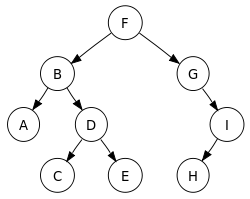
# Python
from itertools import chain
from collections import deque

class n(object):
    left = None
    right = None
    value = None

    def __init__(self, value=None, left=None, right=None):
        self.value = value
        self.left = left
        self.right = right

    def __call__(self, left=None, right=None):
        self.left = left
        self.right = right
        return self.value

def preorder(node):
    lefts = []
    rights = []

    if node.left != None:
        lefts = preorder(node.left)

    if node.right != None:
        rights = preorder(node.right)

    return chain([node], lefts, rights)

def inorder(node):
    lefts = []
    rights = []

    if node.left != None:
        lefts = inorder(node.left)

    if node.right != None:
        rights = inorder(node.right)

    return chain(lefts, [node], rights)


def postorder(node):
    lefts = []
    rights = []

    if node.left != None:
        lefts = postorder(node.left)

    if node.right != None:
        rights = postorder(node.right)

    return chain(lefts, rights, [node])


def levelorder(node):
    queue = deque([node])

    while len(queue) > 0:
        node = queue.pop() # Remove from right
        yield node
        if node.left:
            queue.appendleft(node.left)
        if node.right:
            queue.appendleft(node.right)

# Create nodes
_ = None
A = n('A')
B = n('B')
C = n('C')
D = n('D')
E = n('E')
F = n('F')
G = n('G')
H = n('H')
I = n('I')

# Link the nodes
F(B,G)
B(A,D)
D(C,E)

G(_,I)
I(H,_)

print "Pre order:"
print list(node.value for node in preorder(F))

print "In order:"
print list(node.value for node in inorder(F))

print "Post order:"
print list(node.value for node in postorder(F))

print "Level order (queue):"
print list(node.value for node in levelorder(F))
Saturday, February 20, 2010
Python notes, optparse positional argument parsing
    parser = optparse.OptionParser()
    try:
        (options, (first_posarg, second_posarg, )) = parser.parse_args()
    except ValueError:
parser.error("Two positional arguments are required.")Saturday, February 6, 2010
VLC S/PDIF Stuttering fix
I had this problem with VLC where all output going S/PDIF was stuttering with Windows Vista, and now that I got myself Windows 7 X64, I had to re-fix this problem.
Now I finally found the fix, so I decided to save it to here for future reference:
Preferences -> Advanced settings -> Audio -> Output modules -> Win32 waveOut extension output.

Now the AC3/DTS passthrough works without stuttering.
Now I finally found the fix, so I decided to save it to here for future reference:
Preferences -> Advanced settings -> Audio -> Output modules -> Win32 waveOut extension output.

Now the AC3/DTS passthrough works without stuttering.
Saturday, January 2, 2010
Python snippets, find all occurences of string
>>> def find_all(string, occurrence):
...     found = 0
...
...     while True:
...         found = string.find(occurrence, found)
...         if found != -1:
...             yield found
...         else:
...             break
...
...         found += 1
...
>>>
>>> print list(find_all("awpropeoaspwtoapwroawpeoaweo", "p"))
[2, 5, 10, 15, 21]
>>>
>>> print list(find_all("Overllllapping", "ll"))
[4, 5, 6]
Note: Finds all overlapping matches.
Friday, January 1, 2010
Add your program to "Default Programs" in Windows 7
I wanted to have chromium in "Default Programs", so I can associate HTTP protocol to it, here is how I did that. If you want to do same just change
For your own program just change the chromium/path etc. to something suitable for your project.

ChromiumToSetDefaults.reg:

C:\\Program Copies\\Chromium\\chrome.exe to point your chrome.exe, note that is in two places!For your own program just change the chromium/path etc. to something suitable for your project.

Windows Registry Editor Version 5.00

; Infamous capabilities:

[HKEY_LOCAL_MACHINE\SOFTWARE\Chromium\Capabilities]
"ApplicationDescription"="Chromium - Beta Google Chrome"
"ApplicationIcon"="C:\\Program Copies\\Chromium\\chrome.exe,0"
"ApplicationName"="Chromium"

[HKEY_LOCAL_MACHINE\SOFTWARE\Chromium\Capabilities\FileAssociations]
".htm"="ChromiumURL"
".html"="ChromiumURL"
".shtml"="ChromiumURL"
".xht"="ChromiumURL"
".xhtml"="ChromiumURL"

[HKEY_LOCAL_MACHINE\SOFTWARE\Chromium\Capabilities\URLAssociations]
"ftp"="ChromiumURL"
"http"="ChromiumURL"
"https"="ChromiumURL"

; Register to Default Programs

[HKEY_LOCAL_MACHINE\SOFTWARE\RegisteredApplications]
"Chromium"="Software\\Chromium\\Capabilities"

; ChromiumURL HANDLER:

[HKEY_LOCAL_MACHINE\Software\Classes\ChromiumURL]
@="Chromium Document"
"FriendlyTypeName"="Chromium Document"

[HKEY_LOCAL_MACHINE\Software\Classes\ChromiumURL\shell]

[HKEY_LOCAL_MACHINE\Software\Classes\ChromiumURL\shell\open]

[HKEY_LOCAL_MACHINE\Software\Classes\ChromiumURL\shell\open\command]
@="\"C:\\Program Copies\\Chromium\\chrome.exe\" -- \"%1\""
Monday, October 5, 2009
WPF Command line arguments.
App.xaml
<Application ...
Startup="App_Startup">
...

App.xaml.cs;
...
/// <summary>
/// Interaction logic for App.xaml
/// </summary>
public partial class App : Application
{
    // Storing your arguments in your type you wish:
    public static string Input = "";

    void App_Startup(object sender, StartupEventArgs e)
    {
        // Store the arguments to static public you declared:
        Input = String.Join(" ", e.Args);
    }
}
...

Window1.xaml.cs
...
    /// <summary>
    /// Create window.
    /// </summary>
    public Window1()
    {
        Console.WriteLine(App.Input); // Woohoo! Got the input...
        ...
See, MSDN, you don't have to be so damn verbose always, when little codespeak would do.
Subscribe to:
Posts (Atom)